- Your School Type
- Solutions
- Resources
- Blog
- Events
- More
- Contact Us
- Book a Demo
- Get a Quote
When the FIFA World Cup 2026 kicks off on 11 June, 48 teams and 104 matches across the United States, Canada and Mexico will have students talking, predicting and cheering for weeks. That energy is one of the best opportunities you'll get all year — because using sports to engage reluctant readers works. A child who insists they "don't read" will happily pore over team line-ups, player stats and match reports. The trick is meeting them where their enthusiasm already is.
Reluctant readers often aren't reluctant about reading — they're reluctant about reading material that feels irrelevant to them. Sport changes that equation. Following a tournament naturally involves reading: fixtures, scores, biographies, headlines and history. When the content is something a student genuinely cares about, the barrier drops and reading becomes a means to an end they actually want.
Curriculum link: this kind of reading maps neatly onto real literacy outcomes — non-fiction comprehension (stats, tables, infographics), persuasive writing (match predictions, opinion pieces), and oral language (debating who'll win). It's an easy way to show teaching staff that "fun" reading is also "useful" reading.
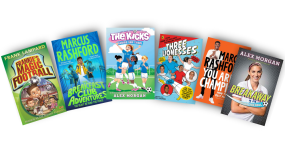
One of the most effective World Cup tie-ins is showing students that the players they watch on screen have also written books. Pulling these onto a dedicated display — with player photos and a "did you know they wrote this?" sign — is a near-guaranteed conversation starter. A starting list for your collection:
A few low-prep ways to ride the wave of football fever:
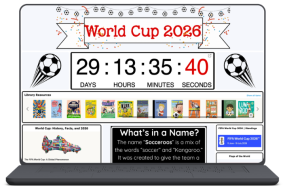
If you're an Oliver customer, you don't have to build everything from scratch. Our downloadable news pages give you ready-made, themed content you can drop straight into your library's home page — a fast way to surface World Cup reading lists, link to relevant resources in your collection and keep students clicking through to books. It's a simple step that connects a global event to the titles already on your shelves.
However your students engage with the World Cup, the goal is the same: turn a moment of shared excitement into a habit of picking up a book. Sometimes the best path to a lifelong reader runs straight through the back pages.
If you're an Oliver customer, creating a dedicated World Cup reading list is one of the fastest and most visible things you can do right now — and once it's live, it surfaces on your OPAC, feeds your home page carousel, and can be pushed into Orbit and LearnPath too. Here's how to set it up:
1. Create the reading list in Authority Control
Go to Authority Control > Reading Lists and create a new list. Name it something students will respond to — "World Cup 2026 Reads", "Football Fever" or "Game On" all work well. You can organise related lists into a hierarchy (e.g. a parent list called "World Cup 2026" with sub-lists for "Football Fiction", "Player Biographies" and "Countries of the World").
2. Add your resources — two ways
A resource can live in multiple reading lists at once, so there's no need to remove titles from existing genre or subject lists to include them here.
3. Add a World Cup icon or image
Oliver v5 lets you attach an image to each reading list. That icon appears next to the list name and next to each title in search results — students can click it to view the full list. A football or World Cup graphic here makes the list instantly recognisable on the OPAC and turns a borrowing prompt into a discovery moment.
4. Set an expiry date
The World Cup final is 19 July. Set the list to expire on or just after that date so it retires automatically — no manual cleanup needed at the end of term.
5. Drop it into your home page carousel
Reading lists populate Oliver's book carousels directly. Add the World Cup list to your home page slider so it's the first thing students see when they open the OPAC. Pair it with the downloadable World Cup news page to give the whole home page a tournament feel without building anything from scratch.
6. Surface it in Orbit and LearnPath
If your school uses Orbit or LearnPath, the same reading list can be deployed there too — a single list reaches students across every platform they use to find resources.
For more on building and managing reading lists in Oliver v5, the full video guide series covers creating, merging, organising into hierarchies and deleting lists — each video is just a few minutes long.
However your students engage with the World Cup, the goal is the same: turn a moment of shared excitement into a habit of picking up a book. Sometimes the best path to a lifelong reader runs straight through the back pages — or the cover of a book with a player's name on it.
Looking for more ways to transform your school library into a dynamic learning hub? Check out these relevant guides and resources from the Softlink blog:


 Oliver Library Software
 LearnPath
 Orbit
Orbit