- Your School Type
- Solutions
- Resources
- Blog
- Events
- More
- Contact Us
- Book a Demo
- Get a Quote

“My only regret is that we didn’t move sooner. It’s made my workday so much smoother and given me tools that genuinely support what I’m trying to achieve as a librarian.”
Tracy Grayson, Librarian, St Peter's College Palmerston North
When St Peter’s College in Palmerston North undertook a school-wide technology upgrade, the library saw an opportunity to modernise. Librarian Tracy Grayson shares how moving to Oliver v5 has streamlined daily tasks, improved access to data, and given the library a more modern, engaging presence within the school.
When Tracy Grayson first stepped into her role as librarian at St Peter’s College 15 years ago, she inherited a long-standing library management system that had served faithfully for many years: Alice. For a time, it did everything required, but as the school roll grew and technology advanced, the limitations of the system began to show.
“Alice had served us well, but the time had come to move forward,” Tracy explains. “The school was upgrading all of its software and hardware, and it made sense for the library to be part of that change.”
St Peter’s College is a Catholic co-educational secondary school with around 800 students and 75 staff. The library plays a central role in supporting literacy, research, and independent learning, so reliability and ease of use were critical in choosing a new system.
The decision to change library systems was not taken lightly. Tracy began by researching options, seeking feedback from other schools, and compiling a detailed proposal for the board.
“I looked at Oliver v5 and another well-known LMS,” she recalls. “Both systems had strong features, but I wanted something that would be intuitive for students and efficient for a sole-charge librarian.”
“Oliver just felt right. It was visually appealing, easy to navigate, and I could see how it would significantly improve Library processes. Softlink’s reputation for support was another big deciding factor. We’d always had positive experiences with them, and having a New Zealand representative available as another point of contact also gave us confidence.”
“Even if we hadn’t been a Softlink customer before, I think we would have chosen Oliver. It’s a strong, well-supported product that meets school library needs beautifully.”
Once approved by the board, the migration to Oliver v5 was scheduled for the Term One holiday break to minimise disruption.
“It was a very smooth process,” Tracy says. “Softlink assigned a project manager who guided us through every step, and the communication was excellent. Any small issues that came up during the data migration were fixed quickly.”
Working closely with the school’s IT team, she used the opportunity to clean up older records and refresh barcode systems.
“Our IT staff assisted with changes at our end, and Softlink’s team made the technical side easy to understand. It was a collaborative process that went well.”
“While I am still learning about all the features of Oliver every aspect of my daily work became simpler,” Tracy says. “Circulation, cataloguing, reporting, it’s all faster and far more intuitive.”
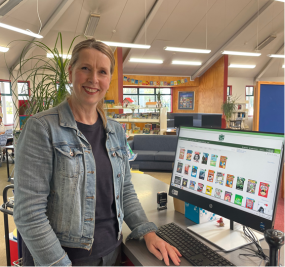
She especially appreciates the ability to display book covers during circulation.
“When a student says, ‘I can’t remember the title,’ I can bring up the image instantly. That visual connection really helps.”
The Smart Cataloguing and Z-Cataloguing tools have also saved hours of time each week.
“As a sole-charge librarian, I am constantly looking at improving processes and efficiencies where I can, and streamlined cataloguing and automated processes has really helped my workflow”.
The dashboard and reports are incredibly useful for collection management.
“You always have a general idea of your collection, but Oliver gives you the facts such as average age of your collection and usage trends. Those statistics help guide purchasing and make conversations with leadership so much easier.”
Before launch, Tracy completed several hours of online training with Softlink’s education consultants.
“The training was excellent. It covered everything I needed to get started, and as I worked with the system, I found it easy to explore new features.”
When questions arise, Softlink’s helpdesk has been quick to respond.
“They’re always available, whether by phone or email and it’s reassuring to know that support is there, and they want to help me make the most of the system”.
St Peter’s chose a cloud-hosted setup, which has removed the need for local servers and software updates.
“We no longer have to worry about backups or maintenance,” Tracy says. “Everything is secure, automatically updated, and accessible from anywhere in the school. It’s reliable and effortless.”
This reliability has helped the library operate more efficiently and adapt quickly to the school’s needs.
“I can focus on students and learning, not on whether the system is going to run properly.”
Beyond practical benefits, the new system has helped refresh the library’s image.
“When students see an attractive, easy-to-use system, they’re more inclined to explore. It makes the library feel modern and dynamic. Teachers have also noticed the difference, especially when reports and data can be shared so easily.”
Looking back, Tracy says the transition to Oliver v5 has been overwhelmingly positive.
“My only regret is that we didn’t move sooner. It’s made my workday so much smoother and given me tools that genuinely support what I’m trying to achieve as a librarian.”
Her advice to other schools considering an upgrade is simple.
“Don’t be afraid to make the change. Talk to a Softlink representative, and ask for a demonstration, or visit another school using Oliver. Seeing it in action makes a huge difference.”
“For us, it’s been about future-proofing the library, streamlining library functions and providing enhanced services to our school community. Oliver v5 helps us do that beautifully.”
If you would like to discuss your school library needs or arrange a demonstration of Oliver v5, contact Bonnie Campbell, Softlink Education Consultant for New Zealand, at sales@softlinkint.com


 Oliver Library Software
 LearnPath
 Orbit
Orbit